
DELIVERABILITY
How to warm up a domain for cold email, and what warm-up cannot fix
Warm-up is the part of cold email infrastructure everyone agrees on and almost nobody measures. Here is the schedule that works on Microsoft 365, what reputation is actually made of, and a week of our own bounce data that shows the one failure warm-up does not touch.
Warming up a domain means sending a small, rising volume of mail that gets opened, replied to and moved out of junk, so that receiving servers build a history of the domain before cold mail arrives. On Microsoft 365 it takes at least 14 days, starts at 1 message a day per inbox, and keeps running after the campaign begins. It improves reputation. It does not fix everything that looks like a reputation problem, and the second half of this post is a week of our own data on the difference.
What does warming up a domain actually do?
A new domain has no history. Google, Microsoft and every smaller receiving system decide what to do with mail from it by looking at what they know, and for a domain registered last week the answer is nothing. Nothing is not neutral. A domain with no history sending cold mail on day one looks exactly like a domain registered for spam, because that is what most such domains are.
Warm-up manufactures the history. A warm-up network is a pool of mailboxes at other domains, run by your sequencer, that exchange mail with yours. The messages get opened, replied to, marked as not junk and left in the inbox. Each of those actions is a positive signal recorded against your domain by whichever provider hosts the recipient. After two weeks the domain has a few hundred accepted, engaged messages behind it, spread across Google, Microsoft and the long tail, and a cold message no longer arrives out of nowhere.
Two things follow from that mechanism. Reputation is built per provider, so warm-up mail that never reaches a Google inbox does nothing for how Google treats you. And reputation is built slowly, by accumulation, so it moves in slopes rather than steps. Both matter later.
How long should you warm up a domain before sending cold email?
At least 14 days before any campaign, and warm-up stays on afterwards. Two weeks is the floor rather than the target. If the sequencer reports warm-up mail still landing in spam at the end of it, the domain is not ready, and starting anyway is the single most common way a new domain is lost.
The instinct to shorten this is strong because 14 days of a domain doing nothing visible feels like waste. It is not waste. It is the difference between a domain that lasts two months and one that is in junk by the end of week three. Every inbox we hand over is already warming when it arrives, and the handover guidance says the same thing in the same words: two full weeks, no campaign before then.
Warm-up does not stop when cold sending starts. The cold mail is the negative pressure on the domain: unknown recipients, low engagement, some complaints. Warm-up is the positive pressure that offsets it. Switch it off and the domain is all pressure in one direction.
What warm-up schedule should Microsoft 365 inboxes follow?
Start at 1 warm-up message per inbox per day, add 1 each day until you reach 5, and hold there. Send no cold mail for the first 14 days. Then begin cold at 1 or 2 per inbox per day and settle at 3, with warm-up still running at 5. Microsoft rewards restraint more than Google does, so these numbers are lower than the ones you will see quoted for Google Workspace, and that is deliberate.
| Period | Warm-up per inbox per day | Cold per inbox per day | Mailbox activity |
|---|---|---|---|
| Days 1 to 5 | 1, rising by 1 each day to 5 | 0 | All positive engagement |
| Days 6 to 14 | 5 | 0 | All positive engagement |
| Days 15 to 21 | 5 | 1 to 2 | Warm-up is most of the activity |
| Day 22 onward | 5 | 3 | Warm-to-cold ratio near 2:1 |
The ratio is the point of the last column. An inbox sending 3 cold messages a day with 5 warm-up messages alongside them is a mailbox where most of what happens is positive. The same inbox sending 3 cold and 0 warm-up is a mailbox where everything that happens is outreach to strangers, which is a description of a spam account. How many cold emails to send per inbox per day covers why 3 is the Microsoft number, and why volume should come from more inboxes rather than harder-worked ones.
The slow ramp is what makes the first week safe. Microsoft applies stricter handling to a mailbox whose volume jumps, and a new mailbox going from nothing to 5 on day one is a jump. Sequencers like Instantly, Smartlead and PlusVibe all have a ramp setting. Leave it on, set the cap at 5, and do not raise the cap because the graph looks slow.
How do you improve domain reputation over time?
Domain reputation improves when the mail a domain sends is authenticated, wanted and consistent, and it gets worse when any of those slips. Warm-up handles the consistency and manufactures the wanted part for two weeks. The rest is on the sending configuration and the list, and no amount of warm-up compensates for either.
- Authentication verified, not just published. SPF, DKIM and DMARC have to pass and align on the mail that actually leaves. A DKIM record that exists but was never enabled on the tenant, or an SPF record over the ten-lookup limit, sends unauthenticated mail with a clean-looking DNS panel. Warm-up mail that fails authentication is teaching the provider the wrong thing about you.
- Volume that looks like a person. 3 cold messages per Microsoft 365 inbox per day, reached slowly. The platform cap is 10,000 recipients a day and is irrelevant. The limit that matters is the point at which a mailbox stops looking like someone with a job.
- A warm-up pool that matches your list. If 60% of your prospects are on Google Workspace and 20% of your warm-up traffic lands there, your effective Google warm-up is a fifth of what the dashboard says. Ask the sequencer what the pool is made of, and check your list with a bulk MX lookup.
- List quality above everything. Bounces above about 5% mark a sender as a list-quality problem regardless of warm-up, and a single spam-trap hit undoes weeks. Verify the list before the first send, not after the first bounce report.
- Engagement after the campaign starts. Replies, even negative ones, are a positive signal. Mail that is deleted unread is a weak negative. Mail marked as spam is a strong one. Copy and targeting decide this, and infrastructure cannot.
- Consistency. A domain that sends 300 a day for a week, nothing for two weeks, then 900 in a day has no stable pattern to be trusted on. Steady is better than large.
One structural point sits above all of these. On Microsoft 365, reputation attaches to the tenant as well as the domain, and a tenant is shared by every domain and every customer inside it. Tenant isolation is the reason a well-warmed domain can still inherit someone else's problem, and it is worth asking any provider about before you warm anything.
How do you know whether warm-up is working?
Watch three readings, and be clear about what each one can and cannot tell you. The sequencer's warm-up report shows where warm-up mail landed at the pool mailboxes, inbox against spam, and how many messages it had to rescue from junk. That number falling toward zero over the two weeks is warm-up working. It is the only reading that sees placement, and it sees it only for the pool, not for your prospects.
The message trace on the sending side shows whether each message was accepted or refused by the receiving server, with the refusal code when there was one. It says nothing about inbox against junk, because that decision is made after acceptance, at the recipient, where a sender cannot see. What it does show is refusals, and refusals split by who hosts the recipient are the most useful diagnostic you have. More on that in a moment.
The first small campaign is the third reading. Bounce under 2% and replies arriving at all means the domain is being delivered and read. Our own outbound on this infrastructure runs at 1.73% bounce across 26,698 contacted, and the full spread by campaign is published because the range is the honest number. If the first campaign bounces at 8%, stop and look at the list before you look at the domain.
A bounce spike that looked like reputation, measured
This is our own domain, provisioned on 31 August 2026 on a new Microsoft 365 tenant, put straight onto warm-up in the sequencer at the schedule above, and left alone. The panel below is the message trace for its first seven days, cut into days at midnight US Eastern. Green is accepted by the receiving server, red is refused.
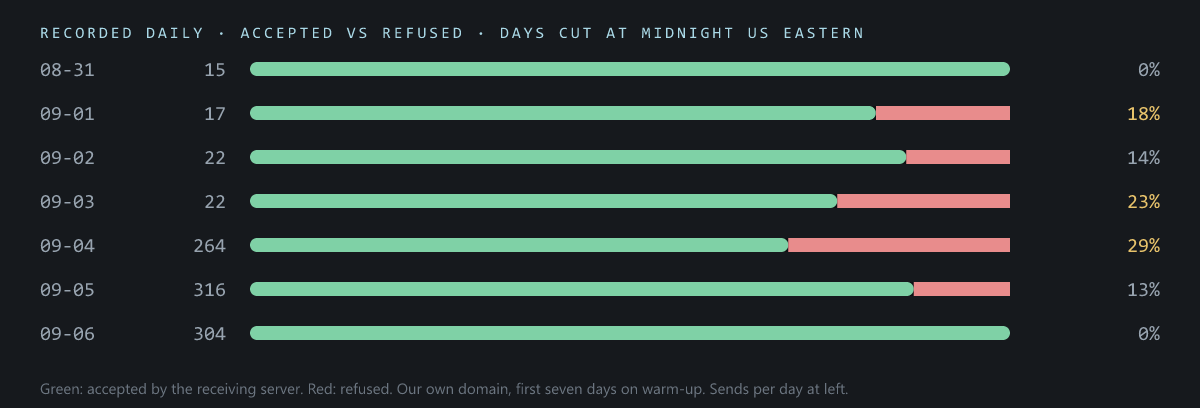
Read cold, that is a domain reputation story. A new domain refused at 18% on day two, climbing to 29% by day five as volume rose, then recovering to 0% by day seven as warm-up took hold. It is a satisfying shape. It is also the wrong reading, and the way to tell is to split the refusals by who was refusing.
The pattern that gives it away
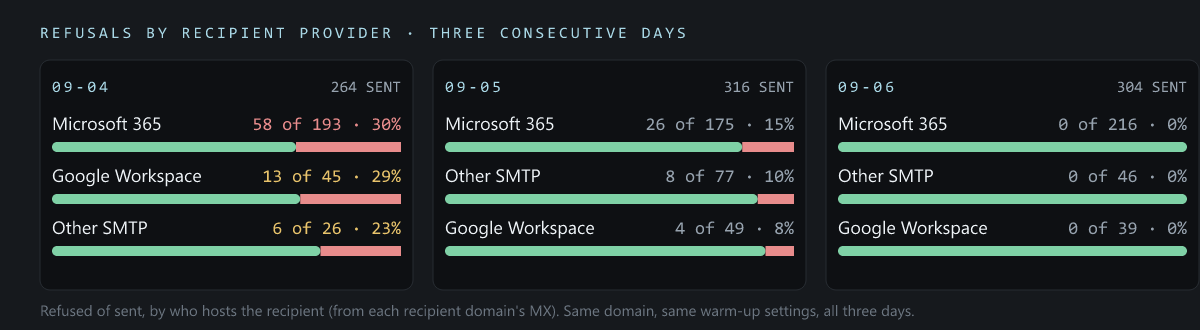
Reputation is a verdict each provider reaches about you separately. Google's opinion of a domain and Microsoft's opinion of it are built from different signals on different timelines, and they almost never agree to the percentage point. So a reputation problem shows up lopsided: Microsoft 365 refusing 30% while Google accepts nearly everything, or the reverse. And because reputation is accumulated, it moves in slopes. A domain does not go from 29% refused to 0% overnight on reputation alone.
What the split shows instead is a flat rate across Microsoft 365, Google Workspace and everyone else on the same day, within a few points of each other, and then every provider clearing together on the same day. Three receiving systems with nothing in common do not reach the same verdict at the same hour. A refusal rate that is the same regardless of who is receiving was decided before the mail reached any of them. That means the sending side.
What it was
Every refusal we sampled that week carried the same code: 550 5.7.708, which Microsoft describes as traffic not accepted from this IP. The IP in that sentence is the one connecting to Microsoft to submit the message, which for a sequencer is the sequencer's own outbound address, not anything the domain owns. Microsoft was declining a subset of the addresses our sending tool submitted from, and doing it to a second domain of ours on a different tool in the same hours.
Two measurements settled it. By the hour, the rate sat between 29% and 44% for four days while hourly volume swung from 5 messages to 170, and then went 31%, 29%, 9%, 0% inside one evening on both domains. A day-level chart averages that into a slope. The hourly one is a step, and reputation does not do that. And when we took the exact recipients the sequencer had just been refused to and sent to them directly from the same mailboxes over SMTP, bypassing the sequencer, 18 of 18 were accepted. Same domain, same tenant, same recipients. The only thing that changed was the submitting address. It cleared when the tool's IP pool moved on, which is also the fix if it comes back: ask the sequencer to rotate the IP.
Warm-up did not cause the spike and did not cure it. Had we read the first chart on its own we would have lowered the send rate, extended the warm-up, and spent a week waiting for a domain that was never the problem. The lesson is not that warm-up does not matter. It is that most cold email problems are infrastructure problems wearing a content costume, and the way to tell them apart is to split the failures by provider before deciding what to fix. The deliverability guide has the general form of this rule for reply-rate drops: a drop that follows one domain across many campaigns is the domain, one that follows one campaign across many domains is the copy.
What warm-up cannot fix
- Refusals at the submitting IP. The 5.7.708 case above, and any code whose text names the connecting address. Sequencer-side; rotate the IP.
- A tenant restriction. When Microsoft restricts a tenant for outbound, every mailbox on every domain in it stops, and the fix is with Microsoft or the provider, not the warm-up schedule.
- Failed authentication. Warm-up mail that fails DKIM is building a reputation for unauthenticated mail. Fix the record, then warm.
- A bad list. Bounces at 8% are a list problem at any reputation. Verify before sending.
- Copy that reads as spam. Warm-up gets you to the inbox. Whether anyone wants to read what arrives is decided by what you wrote, and we do not control that either.
- Speed. Warm-up cannot be compressed by raising the daily cap. A domain warmed at 20 a day for a week is not a domain warmed at 5 a day for a month.
The warm-up checklist
- Verify SPF, DKIM and DMARC pass on real sent mail before warm-up starts. Published is not verified.
- Connect every inbox to the sequencer and turn warm-up on with the ramp enabled: start at 1, add 1 a day, cap at 5.
- Send no cold mail for 14 days. Set a calendar reminder rather than trusting the urge.
- At day 14, check the warm-up report. If warm-up mail is still landing in spam, wait.
- Start cold at 1 to 2 per inbox per day. Move to 3 after a week. Leave warm-up at 5.
- Watch bounces on the first campaign. Above 5%, stop and fix the list.
- When refusals appear, split them by recipient provider before touching anything. Even across providers is sending-side. Lopsided is reputation.
- Keep warm-up running for the life of the domain.
This is the sequence every inbox we provision goes through, and the handover email states the three settings in the same words: warm-up cap of 5, cold sends of 3 or fewer, 14 days before any campaign. If you would rather the first three steps were done before you receive the inboxes, that is what we provide. Authentication is verified and warm-up is already running when the inboxes arrive. The remaining steps are yours, and they are the ones that decide whether the domain lasts.
Frequently asked questions
How long does it take to warm up a domain for cold email?
At least 14 days before any campaign, and warm-up stays on afterwards. Two weeks is the floor. If the sequencer still shows warm-up mail landing in spam at the end of it, the domain is not ready and the campaign should wait.
How many warm-up emails per day should a Microsoft 365 inbox send?
Start at 1 per day, add 1 each day until 5, then hold at 5. Cold sending starts after day 14 at 1 or 2 a day and settles at 3, with warm-up still running at 5 so most of the mailbox activity is positive engagement.
Should I keep warm-up running after I start sending cold email?
Yes. Cold mail is negative pressure on the domain: unknown recipients, low engagement, occasional complaints. Warm-up is the positive pressure that offsets it. Switching it off leaves the domain with signals in one direction only.
How do I know if bounces are a reputation problem or an infrastructure problem?
Split the refusals by who hosts the recipient. Reputation is a verdict each provider reaches separately, so it shows up lopsided and moves gradually. A refusal rate that is the same across Microsoft 365, Google and everyone else, and clears everywhere on the same day, was decided on the sending side before the mail arrived anywhere.
Does warm-up improve inbox placement or just delivery?
Warm-up builds the engagement history that decides placement. The catch is that a sender cannot see placement for prospects. The message trace shows accepted or refused, and only the sequencer's warm-up report shows inbox against spam, and only for the warm-up pool. Reply rate on the first small campaign is the reading that confirms both.
Infrastructure without the setup
100 Microsoft 365 inboxes on one domain for $30, with SPF, DKIM and DMARC configured and verified before handover. Live in 24 to 48 hours.
Get inboxes